 Properties
The options available from the properties menu depends on the object, line, or partition selected.
The the properties menu includes a drop-down menu that allows for the selection of available objects, lines, and partitions. The 1x1 checkbox function can be used when multiple objects are selected and narrows the drop-down menu options to the selected components.
Note: Properties menus are docking menus. See the Docking Menus section of the Menu Navigation page for additional details.
Object Properties Menu
Both Display and DSP Attributes are shown for component objects.
Display Properties
Most Display Attributes are duplicate fields found under the Format Tab. The functions that are not available under Format are detailed below.
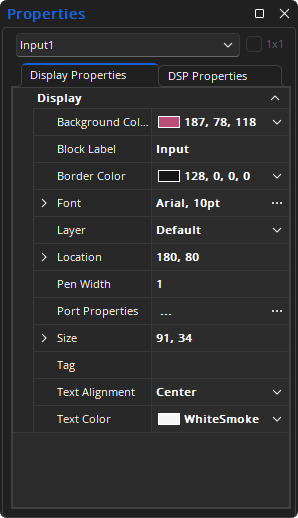
Background Color: Provides a drop-down menu for changing the background color of the selected component or text objects.
Block Label: Text field for block label text.
Border Color: Provides a drop-down menu for changing the border color around selected component or text objects.
Font: Provides options for the size and style of lettering for use in component or text objects.
Layer: Determines which layer the component is assigned to.
Location: Specifies object location (top left in x, y pixels).
Pen Width: Selects the weight of the border around the object.
Port Properites: Opens a dialog in which individual input and output ports can be labeled.
- Index: Lists the channel number, this field is not adjustable.
- Text: Allows a custom name to be assigned to the channel.
- Hover Tip: Allows custom text to be assigned when selecting the component object node (seen when one mouse's over the connection node).
- Adjustment: Allows custom node spacing for easier line drawing.
- Flow Text: Propagates the text to component objects downstream.
- Check / Uncheck All: Will check or uncheck all the Flow text check boxes, respectively.
- Fill: Opens the Fill Port Adjustment Range dialog with options for:
- Audio Input/ Output selection
- Port Range, selection for First and Last
- Port Adjustment, selection for Port Offset
Size: Contains a numerical field for modifying object height and a numerical field for modifying object width.
Tag: Text field for comments or other identifying text.
Text Alignment: Provides options for aligning text to the left, right, or center of component or text objects.
Text Color: Provides a drop-down menu for changing the text color in selected component or text objects.
DSP Properties
Most DSP Attributes are duplicate functions found in an individual component's Control Dialog, as detailed in the Audio or Video object tabs. The Configuration functions that are not available in an object's control dialog are detailed below.
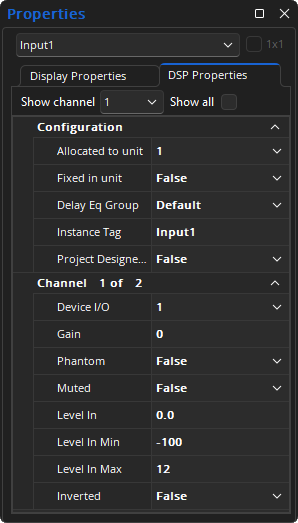
Allocated To Unit: Assigns the component (DSP block) to a particular unit in the system.
Fixed In Unit: Prevents changes to Allocated Unit.
Instance Tag: allows a custom name to be used in lieu of the Instance Tag.
Project Designer Export: Allows the generation of a file compatible with Project Designer when exporting.
Note: There are DSP Attributes that are specific to certain blocks or types of blocks, such as Delay EQ Group or Enable Sleep Mode, that will only be visible while those blocks are selected. Details about those attributes are available in the Control Dialog or Properties sections of those specific components.
Line Properties Menu
Only Display Attributes are shown for Line (component connections) Properties.
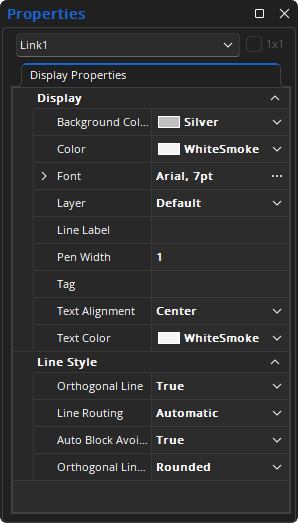
Layer: Determines which layer the component is assigned to.
Line Label: Text field for line label text.
Pen Width: Selects the weight of the border around the object.
Tag: Text field for comments or other identifying text.
Partition Properties Menu
Provides an editable table of attributes regarding the Layout of the current partition.

Tag: Text field for comments or other identifying text.
View Layers: Opens the Layers menu.
Port Properties Menu
The Port Properties menu is accessed by selecting it from the context menu of a component object and can be used to review the channels of that object. The Port Properties menu is a dialog menu and does not have all of the same menus functions of the other properties menus. See the Menu Navigation page for additional details about context and dialog menus.

Index: The channel number and is not adjustable.
Text: Allows a custom name to be assigned to the channel.
Custom Hover Tip: Allows a custom name to be assigned when selecting the component object node.
Adjustment: Allows the node to be spaced for easier line drawing.
Flow Text: Will propagate the text to component objects downstream.
- Check All: Will check all the Flow text check boxes.
- Uncheck All: Will uncheck all the flow text boxes.
Fill: Will open the Fill Port Adjustment dialog to select multiple ports adjustments.
Fill Port Adjustment
A range of changes can be applied using the Fill Port Adjustment dialog. Audio Input or output can be specified, as well as a Port Range and Port Adjustment.
