Overview
The Video Object Tab ribbon menu allows for video component object selection and placement. The ribbon menu and available component objects will be determined by whether a Video or Audio partition is active.
Note: Audio Objects are related to Audio functions and will not be available when working in an Video partition. See the Audio Objects pages for information about specifics about Audio Component Objects. Create a new partition using the Home Tab ribbon menu or see the Partition section of System Considerations for determining the selected tab.
Standard
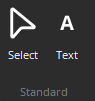
In addition to AV blocks, the Video Object Bar provides the selection pointer (cursor) and text graphic elements. The selection pointer is the default selection for the application. Text Graphic Element can be placed in the layout just as the AV blocks. The text can be edited by a right-click on the graphic element and then choosing Edit Text from the drop-down menu.
Blocks
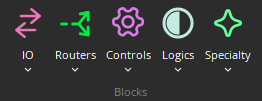
Each category is represented by an icon, with a drop-down menu. To place a Component Object, first choose the appropriate category and then select the desired component from the drop-down menu. Once the component has been selected, left-click at the desired location on the Layout. When placing components into the Layout, certain components will present the user with a pop-up window, called an Initialization Dialog, of configuration options.