 Specialty - Custom Block
Multiple component blocks may be merged into a single Custom Block. Custom Blocks can simplify the design process by encapsulating frequently-used block combinations, allowing them to be collapsed and hidden from view, easily duplicated and reused, and optionally password-protected.
Initialization Dialog
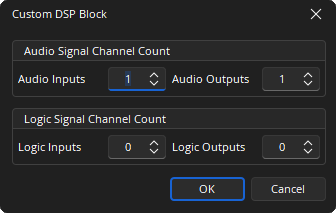
Audio Signal Channel Count: Determines how many audio inputs and outputs the Custom Block will support.
Logic Signal Channel Count: Determines how many logic inputs and outputs the Custom Block will support.
DSP Block Representation
Custom blocks are initially created in an open mode. The inputs and outputs of the Custom Block will appear as Audio Video Pass-Through (APT) and/or Logic Pass-Through (LPT) blocks. Insert other component objects into the Custom Block and wire them to the inputs and outputs.
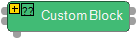
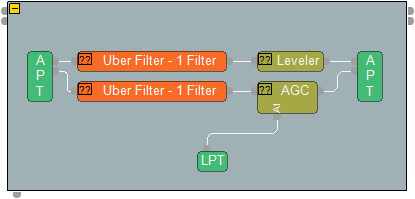
There are four ways to insert component blocks into a Custom Block:
-
Select the block in the Audio Object ribbon menu and then click inside the Custom Block.
-
Hold down the Shift key then drag an existing block into the Custom Block. This will move the existing block into the Custom Block.
-
Hold down the control (Ctrl) key then drag an existing block into the Custom Block. This will insert a copy of the existing block into the Custom Block.
-
Select one or more blocks, then right-click and select “Create Custom Block”. A new Custom Block will be created and the selected blocks will be inserted into it.
When finished with the internal wiring of the Custom Block, press the yellow collapse button [-] in the top left corner to collapse the Custom Block. Press the collapse button [+] again to open the Custom Block.
Password Protection
Custom Blocks can be password-protected by specifying a password in the Object Properties menu of the Custom Block. A password-protected Custom Block cannot be opened without first entering the password. Additionally, individual component objects within a password-protected Custom Block cannot be included in Presets until the Custom Block has been opened.
Pre-Installed Custom Blocks
The processing library comes with pre-installed custom blocks. The pre-installed custom blocks simplify the design process by providing all the blocks necessary to easily set up a system using the TCM-1/TCM-X, TCM-1A/TCM-XA, TTM-X, and TesiraXEL in a pre-installed block. All the internal blocks included in the custom block are pre-configured to the optimal settings. These custom blocks are in read-only and are not modifiable by the user, but may be copied and exported if changes are desired.
For more information, see the Processing Library page under the View tab section.