 Mics - Audio-Technica Mics
When this is selected, an Audio-Technica Mic Initialization Dialog window is displayed. Please also review the Audio-Technica Mic Networking Considerations.
Initialization Dialog
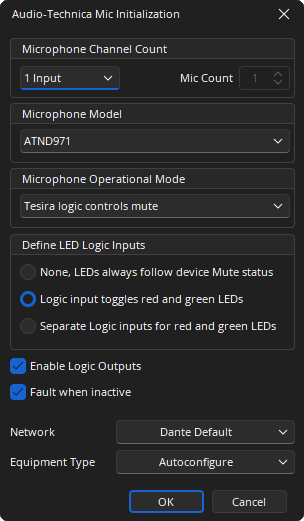
Microphone Channel Count: Determines the number of channels in the block. If Custom is selected from the drop-down list the number of channels can be specified between 1 and 64.
Microphone Model: Selects which Dante-enabled microphone will be supported by the block. The Audio-Technica ATND971, ATND8677 and ATND8734 are supported.
Microphone Operational Mode: The operation of the mute button on the microphone base can be specified. Two push-to-toggle modes are supplied (initially muted and initially unmuted), as well as momentary push-to-talk and momentary push-to-mute. An External setting means that the mute button will display the current mute status by its color, but it will not change the mute state when pressed.
- Toggle, Power up set to mic mute: Initially set to Mute, button press sets to Talk.
- Toggle, Power up set to mic active: Initially set to Talk, button press sets to Mute.
- Momentary, Push-to-talk: Mute unless button is being pressed.
- Momentary, Push-to-mute: Talk unless button is being pressed.
- Tesira logic controls mute: Logic inputs control Mute.
Define Logic Inputs: Determines what type of logic inputs for controlling the LED behavior will be shown on the Dante Mic object, if any.
- None, LEDs always follow device Mute status.
- Logic input toggles red and green LEDs (default).
- Separate Logic inputs for red and green LEDs.
Enable Logic Outputs: Determines whether logic outputs will be provided on the bottom of the Dante Mic object. If enabled, one logic output per channel will be shown. If the Microphone Operational Mode is set to “External”, the logic output will correspond to the physical push button on the mic base. It will be a logic high when the button is pressed and logic low when not pressed. In all other Microphone Operational Modes, the logic output will follow the mute state of the microphone: high when muted and low when unmuted.
Fault when Inactive: If enabled, missing microphone channels or flows expected by this block will present a fault in the Tesira system. If disabled, microphone channels or flows expected by this block will not present a fault or log message in the Tesira system.
Network: Allows the required Media Network Setup to be specified.
Equipment Type: Specifies what type of hardware the compiler should allocate the block to. Review the Equipment Type section for more details.
DSP Block Representation
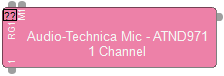
See the Logic Charts page of System Control for more information.
Control Dialog
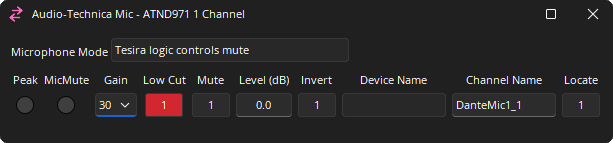
The Control Dialog for ATND971 and ATND8734 are identical:
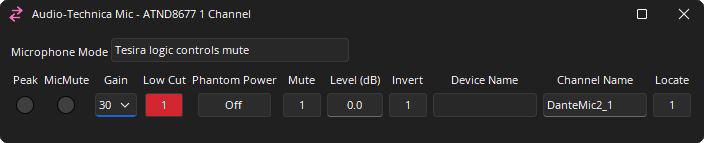
ATND8677:
Channel Indicators and Controls
Peak: A software indicator that flashes when the input signal is within 3dB of clipping.
Mic Mute: Indicates that the microphone’s internal mute circuit has been activated.
Gain: Sets the Microphone Preamp gain to either +30, +40, +50 dB.
Low Cut: When On (default), applies an 80Hz Low Cut filter to the microphone audio.
Phantom Power: Enables 12V Phantom Power. (ATND8677 Only)
Mute: Turns the input signal on/off.
Level: Adjusts the relative input volume. Range of -100 to 12 dB.
Invert: Adjusts the polarity of the input signal. 0° or 180°.
Device Name: The Hostname of the transmitting device. Is read only in the Tesira a Interface. Must be unique. Can be changed via Dante Controller software.
Channel Name: Allows an individual Dante name of each channel. Can be changed offline in the property sheet.
Locate: Allows the user to locate the physical microphone. When pressed, the LEDs on the microphone flash.
Dante Channel Naming Conventions
Initially all channels will be given names in the form <Instance Tag>_<channel number>, where Instance Tag is the default value when the block is created and channel number is within the block, starting with 1.
All Dante names and labels are up to 31 characters in length. Name and label comparisons are case-insensitive; “Guitar” and “guitar” are treated as the same label. Unicode and non-roman characters are not supported.
Device names should follow Domain Name System (DNS) hostname rules. Legal characters are A-Z, a-z, 0-9, and '-' (dash or hyphen). Device names should follow Domain Name System (DNS) hostname rules. Legal characters are A-Z, a-z, 0-9, and '-' (dash or hyphen). Device names must begin with A-Z (or a-z).
Channel labels may use any character except '=' (equals), '.' (full stop or period), '@' (at), \, < and >. Channel labels must be unique on a device. Channel labels do not need to be unique on the network as they are always qualified by device (channel@device).
DSP Properties - Fault when Inactive
If enabled, missing Dante channels or flows expected by this block will present a fault in the Tesira system. If disabled, Dante channels or flows expected by this block will not present a fault or log message in the Tesira system.
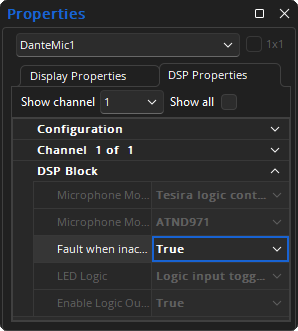
Note: DSP Properties menu is a docking menu. See the Docking Menus section of the Menu Navigation page for additional details.
Audio-Technica Mic Networking Considerations
The Audio-Technica ATND971, ATND8677, and ATND8734 enabled microphone makes use of a dedicated Dante mic Component processing object in Tesira software. Please review the Dante Networking Considerations page and the Configuring Audio-Technica Microphones article for more details.
Audio-Technica Dante mic Networking Details
The Audio-Technica Dante enabled microphones have some unique requirements which must be observed for use on the Dante network. Currently the ATND971, ATND8677 and ATND8734 are supported by Tesira.
Latency Settings
Users are required to use Dante Controller to change the network latency settings of the Audio-Technica Dante mic as needed to match Tesira, as such, they are beholden to the range of latencies allowed in Tesira (1 or 2 ms for Dante as configured in the Network Latency section of Document Settings). Tesira software provides no interface for changing the audio latency for an Audio-Technica Dante mic. An interface for changing the latency for the Dante mic is found in Audinate’s Dante Controller software.
Dante Network External Word Clock
An Audio-Technica Dante mic will always be a follower to external word clock device in the Dante network, referencing the Tesira DAN-1 clock.
IP Addresses
The network IP address of the Audio-Technica Dante mic can be modified using Audinate’s Dante Controller software.
Tesira Hardware Requirements and Compiler Implications
Dante mic Input Blocks may only be placed into SERVER and SERVER I/O's that contain a DAN-1 card. Block functionality depends on the ability to communicate with the ATND971, ATND8677 or ATND8734 mic over the Dante network.
The compiler will track each Dante mic Input block channel as a Receiver channel used on one of the DAN-1 cards in that server, in the same way it tracks channel usage for Dante Input and Output Blocks. Each Dante mic block channel will be assigned to a Dante DAN-1 card during compilation. The network settings of the assigned DAN-1, and the network settings of the Dante mics on the network, will dictate which mics may be assigned to that block channel from Dante Controller.
Number of Microphones per Dante Card
The Dante API is used to implement a conmon (Con(trol)/Mon(itoring)) subscription between the Tesira Server device and the Audio-Technica Dante microphone. A maximum of 32 Dante mic channels can be assigned to any individual DAN-1 card and 16 Dante mics to a TesiraFORTÉ Dante enabled device, although, if AEC processing were to be required, this would exceed the number of available AEC channels. As the Audio-Technica mic processing block is allowed to be up to 64 channels in size (depending on the Equipment Type selected in the Initialization Dialog), the compiler will allocate this to two DAN-1 cards in a single SERVER I/O chassis. A maximum of 32 channels are available per Dante enabled TesiraFORTÉ.
Locate
This feature allows the user to locate the physical microphone. When pressed, the LEDs on the microphone flash. Pressing and releasing the User Switch on the microphone will stop the flashing of the LEDs and return the value of Locate to false.
Block Incompatibility with Other Dante Devices
It is expected that the user will route the correct Dante transmitter channel to the Dante mic input block channel in the Tesira Server. However, when using Dante Controller software the user has the ability to route any Dante transmitter channel to the Dante mic Input Block receiver in the Tesira SERVER or SERVER I/O, including one from a non-Audio-Technica Dante device. The firmware will dynamically discover the manufacturer name and model for the Dante devices transmitting to the Dante mic Input block channels and validate accordingly. If any non-Dante mic (ATND971, ATND8677 or ANTD8734) transmitters are discovered, or if the Dante mic component object contains a different mic selection that the mic model being used the firmware will take the following actions:
- Raise a minor fault "Unsupported device routed to Dante mic channel. Route an appropriate device using Dante Controller". Please refer to the System Status and Fault Reporting sections of the Status Bar page for more details.
- Mute audio for the affected channel(s).
- Inhibit using Tesira’s Dante API to send further commands to the device. Note that Block attributes may still be changed, however, the changes will not have any effect until a supported device’s output flows to that block channel.
- Publish “<invalid device>” to deviceName attribute subscribers. The “Device Name” field in the software control dialog will display this string. Please refer to the System Status and Fault Reporting sections of the Status Bar page for more details.
The user recovers from the “<invalid device>” state by using Audinate’s Dante Controller to re-route that channel’s source from a device compatible with the block.
Note: Connecting one Audio-Technica Dante mic to multiple Tesira Dante mic inputs is not allowed.
Tesira firmware only supports routing any single Audio-Technica Dante mic transmitter to one Dante mic block channel. Fan-out (routing one transmitter to many receivers) on the Dante network is not supported for the Audio-Technica Dante mic.
- Tesira firmware will mute duplicate input channels and deactivate their control functions.
- Also, a minor fault will be raised: “Unsupported Dante mic fanout detected”. Please refer to the System Status and Fault Reporting sections of the Status Bar page for more details.
The user recovers from this state by removing the fanout by rerouting in Dante Controller. The user may also look in the <deviceName> fields of the control dialog to see which channels are offending.