 Controls - HD-1
Tesira Hardware Dialer 1 (HD-1) is a Hardware dialer that integrates with Tesira systems via the control network, using a single CAT5 cable for control and Power-over-Ethernet (PoE). A single HD-1 can be associated with a single VoIP Phone or Telephone Interface line to allow standard calling functions to be accessed. See the Tesira HD-1 Dialer Installation & Operation Guide on Biamp Downloads and the Tesira HD-1 dialer article on Cornerstone for additional information.
Note: VoIP Phone or Telephone Interface component objects must be placed in the layout before an HD-1 can be placed. Attemping to place an HD-1 without it will result in an error message and the block will not be placed.
- For VoIP, an HD-1 is assigned to each Line, so there can be two HD-1 blocks associated with each VoIP Component object.
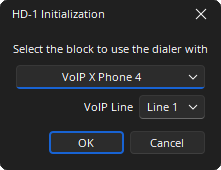
- When a TI phone is in the dropdown list of the Initialization Dialog, the VoIP Line: field is disabled but still visible.
Please review the Remote Device Maintenance section for details on how to configure the device on the network.
Initialization Dialog
Upon creating a new HD-1 block, it must be linked to an existing Telephone Interface or VoIP (or VoIP X) Phone.
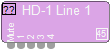
DSP Block Representation
The HD-1 block has five logic nodes: one mute and four that are linked to the soft buttons on the HD-1 device that may be used for various logic functions. Mute is latching, whereas other logic functions are momentary.

See the Logic Charts page of System Control for more information.
Control Dialog
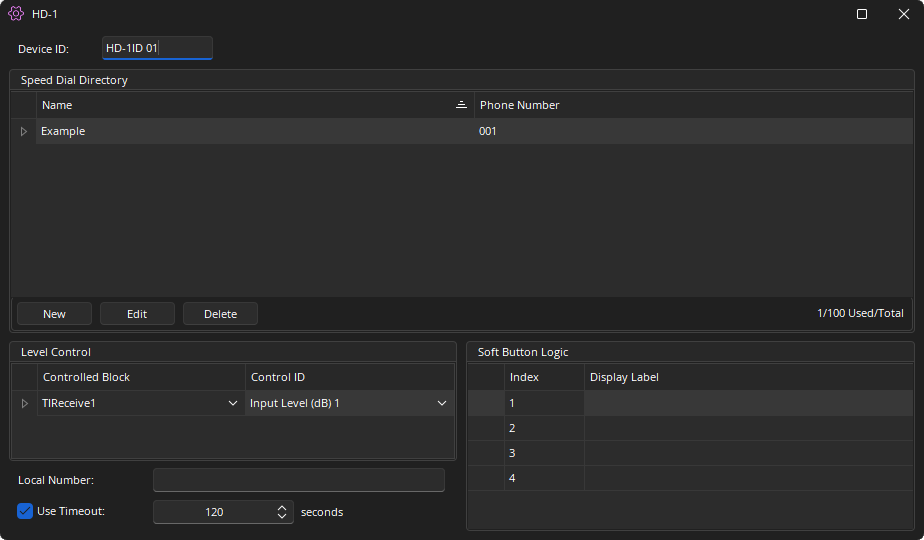
Device ID: The device identifier associated to the HD-1. This can be edited via the Properties sheet. Two HD-1 blocks in any layout must use unique Device ID's, but multiple HD-1 units may use the same Device ID. In that case, the units’ functions are identical and governed by the HD-1 block with the corresponding Device ID.
VoIP Line: A read only value displaying the associated VoIP Line. Not shown when associated with TI blocks.
Speed Dial Directory: Options for New, Edit, and Delete allow speed dial attributes to be edited. Entries are reflected on the HD-1 hardware speed dial directory.
Level Control:
- Controlled Block: Select an existing block instance from any partition in the layout to adjust levels.
- Control ID: When the Controlled Block is selected, the Control ID field allows the selection of the Control ID from that block. This value will be adjustable via the HD-1 volume buttons.
Local Number: Users may enter a number/text to be displayed on the main screen of the HD-1. Limited to 18 characters.
Use Timeout: If checked, the device will automatically time out after a determined period of inactivity and return to the main screen.
Soft Button Logic: Allows labeling the corresponding soft buttons on the HD-1 (seven character maximum). Labels will be visible on the corresponding cell of the soft button grid on the main screen of the HD-1.
Level Control
Select any controllable block in any partition of the current layout and assign a control ID. The drop-down under 'Controlled Block' allows the user to select a block and assign a setting from the Control ID drop-down at right. The value selected under Control ID will be adjustable on the HD-1 volume buttons. The Controlled Block and Control ID together are considered the 'target,' and may be changed even while connected to a system. Level control defaults to the telephone receive block, and levels will scale with the associated block.
Local Number
Enter a local number (the number that calls the HD-1) to display on the main screen of the HD-1. The entry is limited to 18 characters. The Local Number is a strictly a text field, so any text may be entered to display on the HD-1 as long as it does not exceed 18 characters.
Soft Button Logic
Create a label for each of the soft buttons on the HD-1. The label will be shown on the HD-1 main screen above each soft button. These soft buttons may be used to trigger a momentary logic output pulse while on the home screen (and not in the process of manually dialing a number). Labels may not exceed seven characters.
Note: Soft Button Logic and Local Number entries are reflected on the HD-1 hardware screen.
HD-1 Device Maintenance Properties
The HD-1 Properties dialog displays the current settings of the selected HD-1 device. This is accessed via the Remote Device Maintenance dialog menu.