Tesira Software System Control Overview
Once a system design is compiled and downloaded into Tesira Server devices, the system can be controlled in real-time via the Tesira software. The extent of control can be limited with different password levels.
Third Party Control
After initial programming & configuration, Tesira systems may be controlled by RS-232 communication from third-party control systems, such as AMX®or Crestron®, using a Serial Control Port or Ethernet Connection.
The ability for Tesira Server, Server IO, Tesira Amplifiers or TesiraFORTÉ devices to use Telnet or SSH can be enabled or disabled via a Device TTP command or in the Device Maintenance Network Settings dialog. A Tesira Text Protocol (TTP) is used to interface to third party controllers.
Tesira Text Protocol (TTP)
Tesira can be controlled via the control dialog menus in the Tesira software, via third-party controllers or via a computer based terminal application. Supported connection methods include serial RS-232 or Ethernet. If using Ethernet a Telnet or Secure Shell Console (SSH) session can be initiated.
To facilitate external control of Tesira servers Biamp uses TTP. This allows external control of a programmed Tesira system via ASCII characters.
TTP command strings allow the control of Attributes or Services. An Attribute defines the portion of the DSP Processing block to be controlled such as a fader level, crosspoint mute, and would depend on the specific DSP processing block. A Service defines an instruction and function specific to a DSP Processing block (such as the dialer block dial command), Tesira Hardware (Such as a Device Command referencing a Tesira Server) or to perform a system wide command such as recalling a Preset.
The command is case sensitive and uses upper and lower case characters. A line feed needs to be sent after each command. See TTP Syntax for additional details.
TTP has built in error handling and the response will indicate the reason and location in the command where an error has been encountered. An error response will include -ERR at the beginning of the response. A successful response will include +OK at the beginning of the response. Review the Responses section for examples.
When Online with the Tesira Software any Attribute or Service changes made via TTP will update the values in real time.
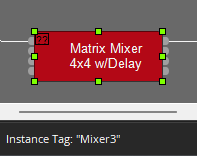
When online - selecting a processing block will show the Instance ID in the Left hand Corner of the Status bar.
String Structure
The commands outlined in this manual are formatted so that any command not in square brackets must be defined as part of the command. These include the Instance Tag, Command and Attributes of a command.
Any commands shown in square brackets (such as [Index] and [Value] )are dependent on the command being performed. They may not be required at all in which case no value is entered.
TTP in Multiple Device Systems
Commands that act on the entire system (For Example- start audio) are forwarded to all the devices automatically, and commands that act on a block (such as set attribute) are automatically forwarded to the device hosting the block.
TTP Resources
To generate command strings to control Tesira products a calculator is available on Cornerstone: TTP Command String Calculator