 Event Logs
Log files are stored by the Tesira software on a one file per device basis. The Event Logs dialog as described below, or the Retrieve Event Logs function in Device Maintenance, allows the extraction of log files from server devices. Functions include viewing logs as well as retrieving logs for saving on a local PC for offline review.
Event Logs Dialog
The Event logs dialog may be used to assist in troubleshooting a Tesira system.
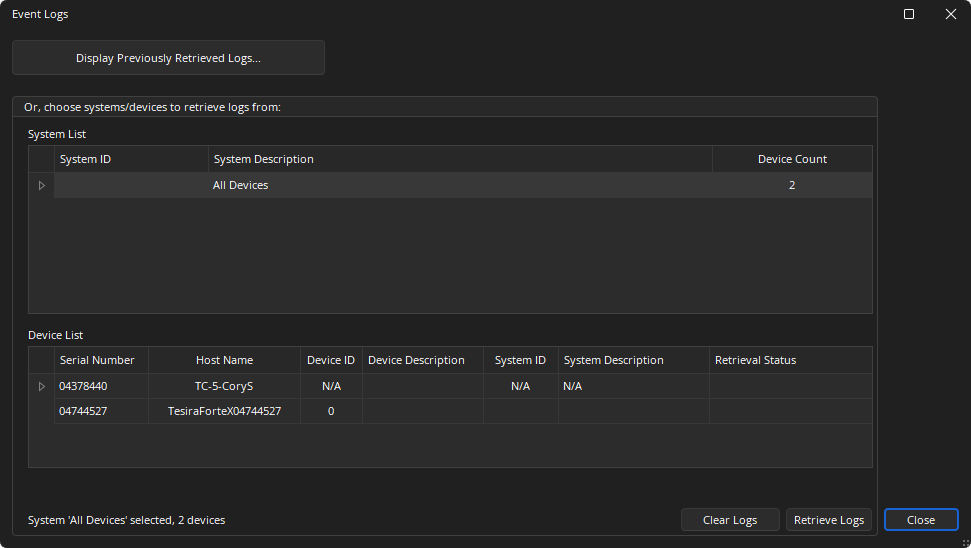
Display Previously retrieved Logs: Opens a standard file selection dialog to open a previously saved XML log.
System List: Provides information on the discovered configured systems. If a system is selected all the devices that are part of the system will be shown in the device list and will have their logs retrieved. Single devices can also be selected in the device list.
Device List: Provides information on discovered devices.
Clear Logs: Removes logs from the selected device.
Retrieve Logs: Displays a new window showing log events and allows logs to be extracted and saved to a folder location on the local machine.
Format
The user logs has a XML or text format that permits easy import into common log viewer programs. The file can be opened in spreadsheet programs such as Microsoft Excel. It will contain the following fields in the specified order:
Sequence: An incremental numbered list indicating the order which items were written to the log.
Entry Time: A date and time stamp (based on the Devices current time)
- Date: Uses the “YYYY-MM-DD” format (i.e. “2015-11-04”)
- Time: Uses the 24 hour format: HH:MM:SS.m. (HH is the hour, MM the minute, and SS.m is the decimal second of the event.)
Synchronized Offset: Time increment since the last entry.
Host Name: Network host name which logged the event.
Severity: Severity of the event that occurred:
- Critical/Crit: Highest priority message. Sometimes associated with a hardware failure. Will also appear next to a firmware update.
- Error/Err: Higher priority message. Indicates a new or cleared error / fault. This may self-clear, but audio or performance may be compromised.
- Warning: Medium priority message. Can be used for general troubleshooting information. Audio delivery and system performance are unlikely to be impacted.
- Error: Notice: Low priority message - reports items such as IP address changes. Can be used for general troubleshooting information.
Message: Details and information relevant to the event.
Log Message Information
FAULT:
- System Fault Detected: Specific Fault detected and fault source
- System Fault Cleared: Specific Fault that is cleared
- Device Fault Detected: Device fault and source
- Device Fault Cleared: Device fault that has been cleared
Configuration: Configuration received.
Device not found: IP address and/or host name of peer device that can’t be discovered on the network. (Reported as a FAULT. See FAULT entry type, above.)
Server boot: Date, Time, Version.
Date and Time Configuration Change: New Date/Time (Log entry time stamp will have old date/time).
DHCP: Entry indicating IP Configuration changed.
Network configuration: New configuration information from Software (depending on config change.)
Serial port: New parameters: port name, baud rate, parity, number of data bits, number of stop bits.
Host Table: New host table.
Firmware Update: Entry marking the start of the update.
Device Reset: Entry in log that the device configuration has been cleared.
Security: Add/remove user: user name Change: Device protected or unprotected.
AVB Connection: Talker Stream Active / Listener Stream Active: MAC address, Stream name, Stream Speed, Stream ID (Stream inactive is reported as a FAULT in the table entry above.)
AVB Status: SRP status change. (Failure on inactive stream, AVB Capability changed)
CobraNet Status: Conductor Status Change.
Dante Status: GrandMaster Change.
Preset Triggered: Preset trigger ID or name.
DSP not communicating: Identification of an audio DSP (such as the DSP-2 cards) that is not communicating. (Handled as a FAULT. See FAULT entry type, above.)
Card not communicating: AVB, CobraNet, or Dante card not communicating: identification information for entity that is not communicating. (Reported as a FAULT. See FAULT entry type, above.)
Resetting clocks to resolve media buffer overflow: A card encountered media buffer overflow and will be reset to fix.
Rebooting to recover from clock sync error: Unrecoverable sync error on Clock Leader media network. Unit may reboot twice to recover from this error.
Audio Muted due to non-recoverable clock fault detection: A card lost synchronization with the internal Tesira media clock. Audio will be muted.