 Mics - SHURE Mics
When this is selected, a SHURE Mic Initialization Dialog window is displayed. Please also review the SHURE Mic Networking Considerations.
Initialization Dialog
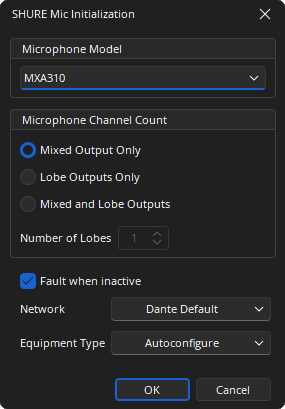
Microphone Model: Selects which SHURE microphone model will be associated to the block. The SHURE MXA310 and MXA910 are supported.
Microphone Channel Count:
- Mixed Output: Provides a single output node which contains a mix of all lobes.
- Lobe Output: An output node per lobe.
- Mixed and Lobe Output: Provides a mix output of all lobes, as well as an output per lobe.
Number of Lobes: Determines the number of channels in the block. If the MXA310 is selected a maximum of 4 outputs can be selected. If the MXA910 is selected up to 8 outputs can be selected.
Network: Allows the required Media Network Setup to be specified.
Equipment Type: Defines the type of hardware this mic input will be allocated to.
Fault when Inactive: If enabled, missing microphone channels or flows expected by this block will present a fault in the Tesira system. If disabled, microphone channels or flows expected by this block will not present a fault or log message in the Tesira system.
DSP Block Representation
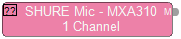
MXA310
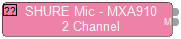
MXA910
Control Dialog
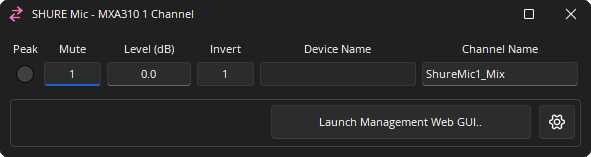
Channel Indicators and Controls
Peak: A software indicator that flashes when the input signal is within 3dB of clipping.
Mute: Turns the input signal on/off.
Level (dB): Adjusts the relative input volume. Range of -100 to 12 dB.
Invert: Adjusts the polarity of the input signal. 0° or 180°.
Device Name: The Hostname of the transmitting device. Is read only in the Tesira a Interface. Must be unique. Can be changed via Dante Controller software.
Channel Name: Allows an individual Dante name of each channel. Can be changed in the property sheet.
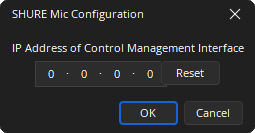
Launch Management Web GUI: Will launch the default browser pointed to the SHURE mic’s control IP address. The IP address of the SHURE mic can be specified using the cog icon. If no IP address has been entered previously and the Launch Management Web GUI button is selected, a dialog prompting for the SHURE control IP address will be presented. Once an IP is specified it remains persistent until modified using the settings icon.
Cog Icon: IP Address specification dialog of Management Interface (opened via the cog icon). The IP specified here is used to launch the SHURE web configuration utility in the default web browser.
Dante Channel Naming Conventions
Initially all channels will be given names in the form <Instance Tag>_Lobe<channel number> or <Instance Tag>_Mix<channel number>, where Instance Tag is the default value when the block is created and channel number is within the block, starting with 1. The Lobe channels are between 1 and 8, depending on the number of lobes selected at the time of block creation. Also the Mix output will be shown if the option was selected at the time of block creation.
All Dante names and labels are up to 31 characters in length. Name and label comparisons are case-insensitive; “Guitar” and “guitar” are treated as the same label. Unicode and non-roman characters are not supported.
Device names should follow Domain Name System (DNS) hostname rules. Legal characters are A-Z, a-z, 0-9, and '-' (dash or hyphen). Device names should follow Domain Name System (DNS) hostname rules. Legal characters are A-Z, a-z, 0-9, and '-' (dash or hyphen). Device names must begin with A-Z (or a-z).
Channel labels may use any character except '=' (equals), '.' (full stop or period), '@' (at), \, < and >. Channel labels must be unique on a device. Channel labels do not need to be unique on the network as they are always qualified by device (channel@device).
DSP Properties - Fault when Inactive
If enabled, missing Dante channels or flows expected by this block will present a fault in the Tesira system. If disabled, Dante channels or flows expected by this block will not present a fault or log message in the Tesira system.
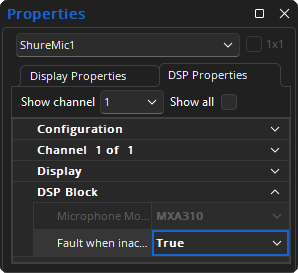
Note: DSP Properties menu is a docking menu. See the Docking Menus section of the Menu Navigation page for additional details.
SHURE Mic Networking Considerations
The SHURE Dante enabled microphones have some unique requirements which must be observed for use on the Dante network. Please review Dante Network Considerations in addition to the following content for additional details. See the Using the Shure MXA910 or MXA920 microphone array with Tesira article for more information.
SHURE Mic
The MXA310 and MXA910 are supported in Tesira. The MXA910 uses Dante to transport up to nine discrete channels of audio. Channels 1 through 8 are discrete for each individual lobe and the 9th channel is an automixed version of all of the available lobes. The MXA310 uses Dante to transport up to 5 discrete channels of audio. Channels 1 through 4 are discrete for each lobe and the 5th channel is an automixed version of all available lobes. This does mean that a Dante capable switch is required. More information on switch setup and detailed connection diagrams can be found in SHURE's MXA910 user guide and MXA310 user guide.
Latency Settings
Users are required to use Dante Controller to change the network latency settings of the SHURE Dante mic as needed to match Tesira, as such, they are beholden to the range of latencies allowed in Tesira (1 or 2 ms for Dante as configured in the Network Latency section of the Document Settings). Tesira software provides no interface for changing the audio latency for a SHURE Dante mic. An interface for changing the latency for the microphone is found in Audinate’s Dante Controller software.
IP Addresses
The network IP address of the SHURE Dante mic can be modified using the SHURE web application. The web management interface can be launched through the Tesira software after the IP address has been defined. If no IP address has been specified before the 'Launch Management Web GUI' button is selected the dialog used to enter the IP will be displayed.
Tesira Hardware Requirements and Compiler Implications
SHURE Mic Input Blocks may only be placed into SERVER and SERVER I/O's that contain a DAN-1 card, or a Dante enabled TesiraFORTÉ device.
Number of Microphones per Dante Card
The Dante API is used to implement a conmon (Con(trol)/Mon(itoring)) subscription between the Tesira Server device and the SHURE Dante microphone. A maximum of 32 Dante mic channels can be assigned to a DAN-1 card, and 32 channels of Dante audio to the TesiraFORTÉ.
Microphone performance can be enhanced by assigning each individual lobe to its own dedicated AEC processing block. In systems where this is done, typically the Mixed output of the microphone is not needed.
The Dante enabled TesiraFORTÉ shall support 3x MXA310 (all channels using AEC) or 1x MXA910 with all channels using AEC. A SERVER or SERVER I/O with one DAN-1 card can support 6x MXA310 or 3x MXA910. This is assuming all lobes of the microphone are being used. If less lobes are used however the number of devices will increase.
Locate
This feature is not available on the SHURE MXA910 and the MXA310.
Dante Controller
To assist with connecting the microphones in Audinate’s Dante Controller, the lobe channels will be given default channel names that indicate they are lobe channels, and the automix channel will be given a channel name indicating that it is the automix channel. If the SHURE Mic input block number of channels is modified using Edit Block Properties, the names on the channels will be modified with new default names, if however a channel name has been changed from its default, then the channel’s name will be left unmodified.
Please ensure the correct SHURE mic Dante transmitter channel is routed to the correct SHURE mic input channel in Tesira. When using Dante Controller software it is possible to route any transmitter channel to any SHURE mic Input Block, so for simplification it is highly recommended doing this in a 1-to-1 relationship, i.e. CH1-to-CH1, CH2-to-CH2, CH3-to-CH3, (and so on).