 IO - AV Output
The AV Output Block serves as an interface to process and/or route video and audio streams from the network to an output. The block represents the conversion of AV network streams to wired outputs on a TesiraLUX OH-1.
Initialization Dialog
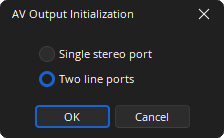
Single Stereo Port: Provides for a stereo mix output on the two physical audio outputs on the OH-1.
Two Line Ports: Discrete ports labeled “L1” and “L2” corresponding to the two physical audio outputs on the OH-1.
DSP Block Representation
AV
HDCP may be enabled from the AV Output Control Dialog:

AV input with HDCP enabled: (See HDCP Management for more information)

AV: The video content to the HDMI port.
L1 & L2: The audio content sent to the audio outputs.
Logic
Logic for an AV Input are as follows:
- H Con: HDMI connected
- H Tx: HDMI transmitting
See the Logic Charts page of System Control for more information.
Control Dialog
From Network
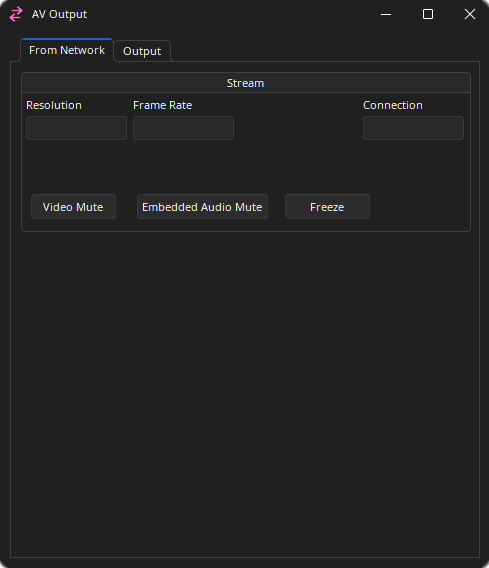
Resolution: The currently detected resolution.
Frame Rate: The currently detected frame rate.
Connection: Shows which network port is currently in use.
Video Mute: When enabled a stream with all black frames is transmitted.
Embedded Audio Mute: Mutes the embedded audio.
Freeze: When enabled the current frame is held on the display.
Output
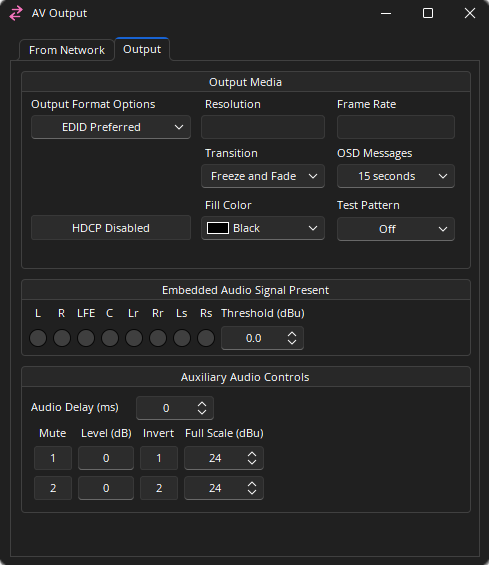
Output Media
Output Format Options: The resolution presented from the output to the connected device.
- EDID Preferred
- 4096 x 2160
- 3840 x 2160
- 2560 x 1600
- 1920 x 1200
- 1920 x 1080
- 1280 x 800
- 1280 x 720
- 800 x 600
HDCP: Click to enable/disable HDCP function on the media output.
Resolution: The current resolution detected.
Frame Rate: The current frame rate detected.
Transition: If Freeze and Fade is chosen, the current frame is frozen, then faded. Instant will switch immediately when a new source has been selected.
OSD Messages: Sets the amount of time on screen display messages are shown. When set to “On” messages are displayed continuously. Off 5 Seconds 15 Seconds On.
Fill Color: Used as fill when video is letter-boxed.
Test Pattern: Replaces the video source image with the selected test pattern. Color Bar Grid HDMI 4:2:0 Test.
Embedded Audio Signal Present: (L) Left, (R) Right, (LFE) Low Frequency Effects, (C) Center, (Lr) Left Rear, (Rr) Right Rear, (Ls) Left Surround, (Rs) Right Surround, the Threshold setting specifies the level that the embedded audio signal will show signal present. Range of -64 - +24 dBu.
Auxiliary Audio Controls
Audio Delay: The amount of additional audio delay. Range of 0 - 64 ms.
Mute: Turns the input signal on/off.
Level: Adjusts the relative input volume. Range of -100 to +12 dB.
Invert: Reverses the polarity of the input signal.
Full Scale (dBu): The amount of analog gain for specifying differing output levels (mic or line). -31 (Mic level), 0 dBu to +24 dBu in 6 dB steps.
The minimized state of the AV Output dialog will show the 8 Embedded Audio Signal Present LEDs and their labels.