 HDCP Management
High-bandwidth Digital Content Protection (HDCP) is an industry-adopted specification for the protection of high-value entertainment media on digital video interfaces. HDCP-encrypted content is not allowed playback on video systems that do not conform to the specification, which often creates difficulties in Pro AV deployments. The addition of HDCP management functionality to Tesira software will allow TesiraLUX devices to support playback of protected content. TesiraLUX also intelligently manages the HDCP topology to reduce the risk of the protected source blanking content to the entire system.
Additional details about HDCP are a available via the Cornerstone article HDCP with TesiraLUX.
HDCP Topology Considerations
There are two predominate versions of HDCP currently. Each version of HDCP uses differing topology limitations for the maximum number of devices, level of repeaters, network transport and if content is allowed down-conversion to a previous HDCP version. See the following table for a description of HDCP capabilities:
| HDCP Version | Network Transmission | Maximum Devices | Maximum Levels | UHD | Output to HDCP 1.4 |
|---|---|---|---|---|---|
| HDCP 1.4 | No | 128 | 7 | No | Yes |
| HDCP - Type 0 | Yes | 32 | 4 | No | Yes |
| HDCP - Type 1 | Yes | 32 | 4 | Yes | No |
In HDCP terms, devices are classified as sources, repeaters or receivers. For example, a media player is a source, an HDMI splitter is a repeater and a television is a receiver.
Per the HDCP rules and regulations, each protected HDCP 2.x source is allowed 32 downstream devices across a maximum repeater depth level of 4. The depth count starts at the first repeating device. TesiraLUX encoders and decoders are HDCP repeaters. The network is not included in the device or level limits. A simple system of source, encoder, two decoders and two displays are a count of 5 devices with a level depth of 3.
Once the connected devices exceed the maximum devices or levels allowed by the standard, the source will deny playback of protected media. TesiraLUX intelligently manages where content is allowed so overage conditions are mitigated.
Network Transmission
Network transmission is only allowed under HDCP 2.x protection. HDCP 1.x is not allowed over the network according to the HDCP specifications. In TesiraLUX, any HDCP protected input source is converted to HDCP 2.2 for network transmission. This means the maximum number of devices supported for each source is 32 with repeater device levels of 4, regardless of the input HDCP version. This translates to a fanout limit of 15 decoders depending on downstream devices outside the Tesira system.
UHD Type 1 Content
HDCP 2.2 “Type 0” protected content may be output to a HDCP 2.x or downgraded to a HDCP 1.x receiver. The owners of high-value content may opt to enable HDCP 2.2 “Type 1” support on the media (common on UltraHD Blu-ray discs).
HDCP 2.2 Type 1 content is not allowed to be down-converted to previous standards and must be shown on a HDCP 2.2 receiver. A display having only HDCP 1.4 support is not allowed to display HDCP 2.2 Type 1 content. Only “Type 0” content is allowed down-converted as needed to support the attached display system.
Managing HDCP in Tesira
When designing a system that includes inputs/outputs that will stream HDCP content, a user will be required to allow the TesiraLUX devices (IDH-1; OH-1) to enable HDCP content.
HDCP functionality is managed from a single location and can be accessed throughout the Tesira software by clicking the shield icon from any of the following locations:
-
Right-click Context Menu of the video partitions
-
Right-click Context Menu and of the AV Input and AV Output blocks
-
Media section of the System Tab ribbon
HDCP may also be enabled/disabled individually from the Control Dialog of Input or Output tabs of the AV Input or AV Output DSP blocks, respectively.
Clicking the HDCP management button will bring up the following window which lists all blocks in all partitions with HDCP functionality:
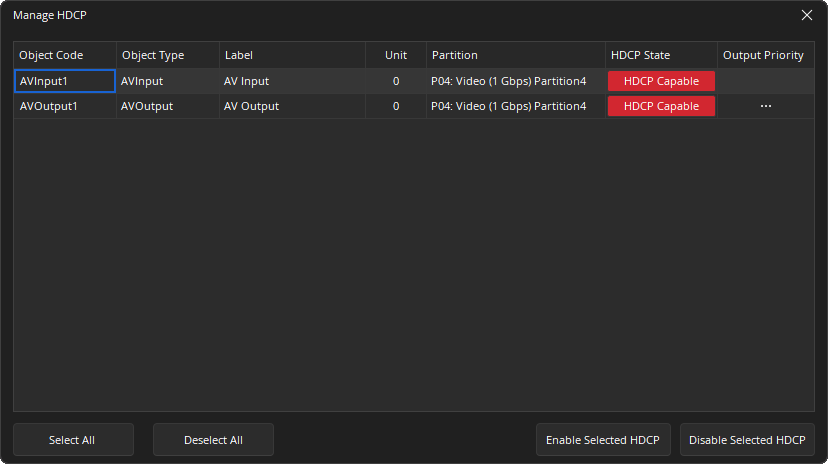
Each block's HDCP state may be toggled individually, in groups or en masse. By choosing "Select All" prior to enabling or disabling HDCP, all selected blocks will be enabled/disabled.
Design Considerations - Output Prioritization
Tesira software sets the priority by which output devices (monitors) connected to the system receive fast switching for streaming HDCP content. For nearly instantaneous protected stream switching, the following limits are observed:
-
IDH-1 – 31 downstream devices total, including fanout to each HDCP-enabled OH-1 decoder.
-
OH-1 – Each decoder will pre-authenticate with up to 32 HDCP-enabled IDH-1 encoders.
More than 32 devices may be connected in a system, but once priority is set, any devices that fall outside that priority require a moment to re-authenticate and stream HDCP content if stream routes are changed.
Devices downstream of the TesiraLUX system also count toward the 32 device and 4 level limits required by the HDCP regulations. TesiraLUX will factor this in to the output prioritization and deny content to outputs that exceed the limitations to prevent source blackouts.
HDCP priority is determined for each AV block by several factors when designing a system in Tesira software. Priority is determined in the following order:
-
The number of signal path segment hops.
-
Connections from lower AV Router block output port numbers prioritized over connections from higher output port numbers.
-
If the previous factors are equal, priority is determined alphanumerically based on the AV Output block label text.
-
If the previous three factors are equal, priority is determined by the block Object ID
Priorities calculated by the software can be viewed by expanding the Output Priority of any AV Output.
HDCP Connection Persistence
To prevent dropouts at the media source, TesiraLUX units will attempt to maintain HDCP authentication sessions on as many peers as possible, while preventing limit overages, based on the considerations in the sections that follow.
OH-1
The OH-1 prevents topology changes from causing blackouts on upstream devices when encryption is active:
-
The OH-1 maintains the last connected topology on the HDMI output while powered on
-
The OH-1 reports the last connected topology upstream unless topology is reset
A saved topology is reset to the current topology when one of the following occurs:
-
A new device is connected that isn't in the saved topology
-
A new device fails authentication
-
A device configuration is cleared
-
HDCP is disabled on the OH-1
The presence of any of the above scenarios may cause temporary audio and video dropouts while HDCP topologies are propagated to the protected source. Additionally, turning a connected display on or off may also cause topology changes/blackouts depending on display behavior.
In cases of no Audio or Green Screen, the potential causes are:
-
OH-1 does not have a session key
-
Type 1 content received by OH-1 and downstream device is not HDCP 2.2 or greater
-
Device is not in the priority list determined by Tesira software
Any OH-1 that has more than 30 downstream devices or more than three repeater device depth levels will not authenticate with an IDH-1 as the device count will exceed 32, the depth level will be four and thus exceed the HDCP 2.2 limitations.
IDH-1
The IDH-1 maintains a list of devices that are chosen to authenticate for HDCP. This list is updated any time an event occurs that may change the list contents, such as:
-
A new OH-1 is discovered
-
HDCP-Enabled status changed on the IDH-1 or OH-1
-
Downstream topology change
-
Router change for the IDH-1
-
Router change for an OH-1 that can be connected to the IDH-1