Overview
The Format Tab ribbon menu has options for customizing of text and colors used in the Layout and associated Component, Line, and Text Objects.
Font
Provides options for lettering styles, sizes, bold, and italics for use in component or text objects.
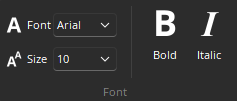
Font: Provides a drop-down menu of lettering styles for use in Component or Text Objects.
Size: Provides a drop-down menu of lettering sizes for use in Component or Text Objects.
Bold: Changes the selected text to a thicker version of the chosen font.
Italics: Changes the selected text to an italicized version of the chosen font.
Alignment
Provides options for aligning text to the left, right, or center of component or text objects.
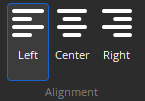
Left: Aligns the selected text to the left margin of the Component or Text Object.
Center: Centers the selected text between the left and right margins of the Component or Text Object.
Right: Aligns the selected text to the right margin of the Component or Text Object.
Color
Provides a selection of colors for changing the background, text, and border color of component or text objects. Each color selection drop-down menu is divided into Custom, Web, and System tabs.
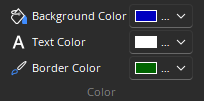
Background Color: Provides a drop-down menu for changing the background color of the selected Component or Text Objects.
Text Color: Provides a drop-down menu for changing the text color in selected Component or Text Objects.
Border Color: Provides a drop-down menu for changing the border color around selected Component or Text Objects.