 Paging - Paging Station and Zone Control
The Paging and Zone Control block manages the page codes in the paging system. Only one of these blocks is permitted in the layout.
Note: Place partition connectors before or after the Paging Zone block when cross-partition routing is required.
Initialization Dialog
When Paging Station and Zone is selected the Paging and Zone Control Initialization Dialog window is displayed.
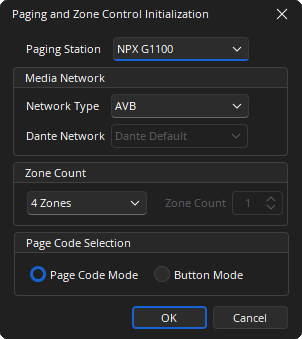
Paging Station: Drop-down to select one NPX model to start the paging system (default is NPX G1100). Additional paging stations can be added after initialization.
Media Network: Defines the type of network that will transport audio from one endpoint to another endpoint. The drop-down allows the user to choose an AVB or Dante network type.
- The Dante Media Network allows the user's existing network to transport audio from the NPX to the Tesira system.
- The Paging and Zone Control Initialization block does not support paging systems using a mix of AVB and Dante. They must be all AVB or all Dante.
Zone Count: Represents the number of zones in Paging System. The maximum number of zones supported by a Tesira system is 32.
Page Code Selection: Page Code Selection allows for either Page Code Mode or Button mode selection. See Paging Station Control Dialog for additional details. 4-Key Paging Stations cannot use Page Code Mode and will have Button Mode selected automatically.
DSP Block Representation
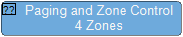
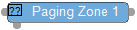
The NPX Paging System is represented by the Paging Station, Paging and Zone Control, and a selected number of Paging Zone Blocks as a group:

Control Dialog
The Paging and Zone Control Block manages the page codes for a particular NPX paging station device.
Page Codes Tab
The information in the Page Code Tab allows the user to add and modify page codes. Click Add New and the Page Code fields will display.
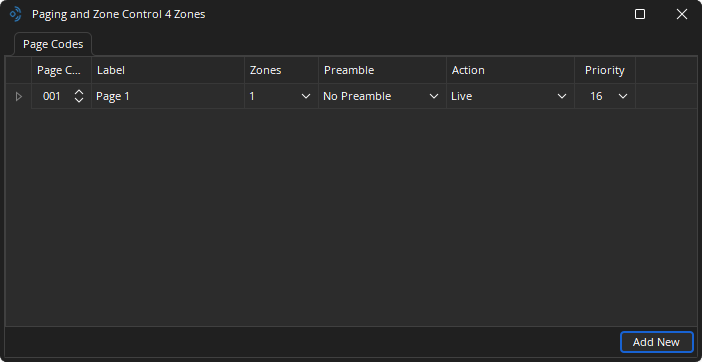
Page Code: Column list of all of the system Page Codes.
Label: Displays on the NPX LCD screen when the associated Page Code is used.
Zones: Drop-down lists the Page Code destination zones. One or more zones may selected.
Preamble: Drop-down list of preambles to be played before the Action is performed. Select:
- No preamble.
- One of five default preambles.
- One of five custom preambles to be loaded on the device via Device Maintenance.
Action: Drop-down lists of Live Page or Recorded Messages. The playback of a recorded message applies only to the paging station that initiates the Page Code. Users cannot initiate playback on one paging station from another paging station.
Priority: Drop-down lists 16 levels of priorities with 1 being the highest and 16 being the lowest.
Delete: Will delete the page code. (An "Are you sure" pop-up will display)
Dante Channels Tab
When the Dante network is selected, the Dante Channels tab displays in the control dialog. This tab displays a table containing the Dante channel names for the Paging System and the Paging and Zone Control block.
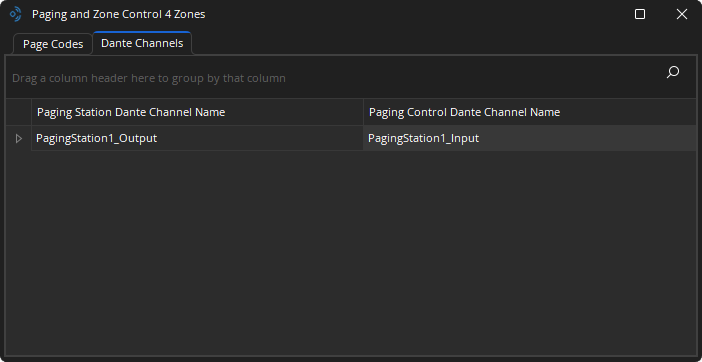
A connection using Audinate's Dante Controller is required. See the Dante Controller and Channel Routing section of Dante Network Considerations for additional details.
IMPORTANT VERSIONING NOTE
When updating firmware, if your NPX firmware version is less than 1.4.1, it is suggested that you first update the firmware to v1.4.1 before updating it to v2.0.x or higher to be able to discover and/or manage the devices with Biamp Workplace. This is the most stable path for the equipment. Both versions are available for download.