 Network - Attero Tech Wall Plate
When this object type is selected from the Audio Objects Tab, an Attero Tech Wall Plate Initialization Dialog window is displayed.
Initialization Dialog
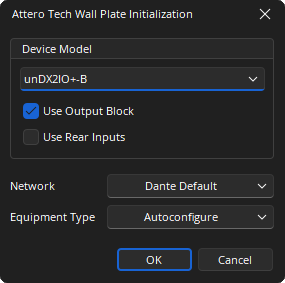
Device Model: Selects which Attero Tech wall plate model will be associated to the block. The unDX2IO+-B, unDX4I-B and the unD6IO-B are supported. Depending on the device model selected further options specific to that model will be presented.
Network: Allows the required Media Network Setup to be specified.
Equipment Type: Defines the type of hardware this input will be allocated to.
DSP Block Representation
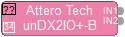
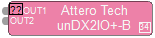
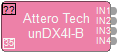
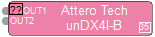
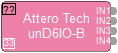
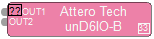
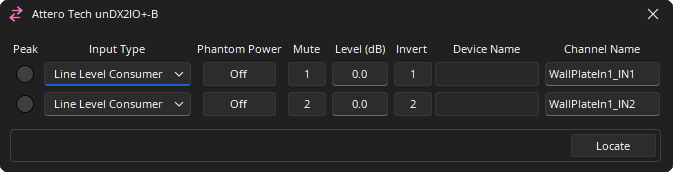
Control Dialog
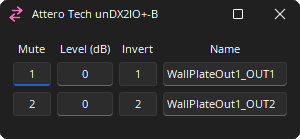
Attero Tech unDX2I0+-B
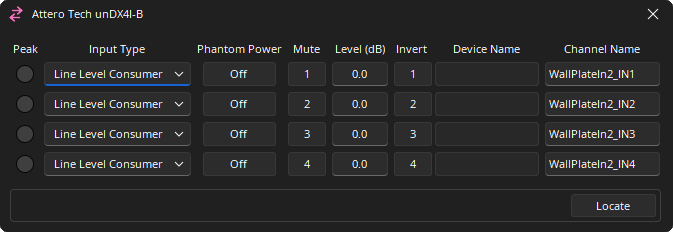
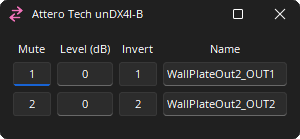
Attero Tech unDX4I-B
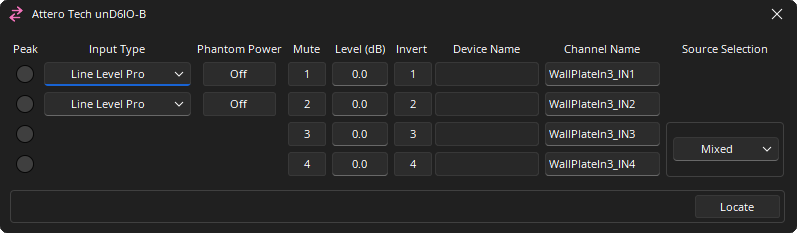
Attero Tech unD6IO-B
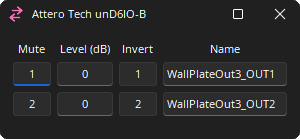
Channel Indicators and Controls
Peak: A software indicator that flashes when the input signal is within 3dB of clipping.
Input Type: Sets the amount of analog gain for that channel and is used to compensate for differing input levels. Details below.
Phantom Power: Assigns +48 Volt phantom power to the input for use with condenser microphones.
Mute: Turns the input/output signal on/off.
Level (dB): Adjusts the relative input and output volumes.
Invert: Adjusts the polarity of the input signal.
Device Name: The Hostname of the transmitting device. Is read only in the Tesira Interface and must be unique. Can be changed via Dante Controller software and behaves in the following manner:
- When not connected to the Tesira system, the field will be empty.
- When connected to the Tesira system, but no device has been connected to the channel with Dante Controller, the field will display “<disconnected>”.
- When connected to the Tesira system, and a device has been connected to the channel with Dante Controller, but the wrong type or model of device has been connected, the field will display “<invalid device>”.
- When connected to the Tesira system, and the correct model of device has been connected to the channel with Dante Controller, the field will display the name of the connected device.
Channel Name: Allows an individual Dante name of each channel. Can be changed in the property sheet as well as in the Control Dialog.
Source Selection: Specifies the input source to be used. (only available on unD6IO-B model)
Locate: When Locate is enabled, the power LED on the wall plate will flash green.
- Attero Tech devices do not appear in the Tesira Locate window. The Locate button in the Attero Tech input Control Dialog must be used.
- To initiate locate mode wall plates must be first connected to the Tesira system with Dante Controller.
- Locate mode will not automatically timeout and disable itself – it is active until explicitly deactivated or until the device is power cycled. If the device is power cycled, the Tesira will reactivate Locate if needed when the device reconnects to Tesira.
Input Type
| Device | Channels | Setting on Tesira Control Dialog | Setting on unIFY | Equivalent Gain Value / TTP Value |
|---|---|---|---|---|
| unDX21O+-B | Channels 1 & 2 | Line Level Pro | 0dB (pad active) | -18.0 |
| Line Level Consumer | 0dB | -3.0 | ||
| Mic Gain Low | +25dB | 25.0 | ||
| Mic Gain High | +40dB | 40.0 | ||
| Channels 3 & 4 | Line Level Pro | +4dBu (Pro) | 4.0 | |
| Line Level Consumer | -10dBV (Consumer) | -10.0 | ||
| unDX4I-B | Channels 1-4 | Line Level Pro | 0dB (pad active) | -18.0 |
| Line Level Consumer | 0dB | -3.0 | ||
| Mic Gain Low | +25dB | 25.0 | ||
| Mic Gain High | +40dB | 40.0 | ||
| unDX6IO-B | Channels 1-2 | Line Level Pro | 0dB (pad active) | -18.0 |
| Line Level Consumer | 0dB | -3.0 | ||
| Mic Gain Low | +25dB | 25.0 | ||
| Mic Gain High | +40dB | 40.0 |
Dante Channel Naming Conventions
Initially all channels will be given names in the form <Instance Tag>_IN<channel number> for Inputs, or <Instance Tag>_OUT<channel number> for Outputs, where Instance Tag is the default value when the block is created and channel number is within the block, starting with 1.
All Dante names and labels are up to 31 characters in length. Name and label comparisons are case-insensitive; “Guitar” and “guitar” are treated as the same label. Unicode and non-roman characters are not supported.
Device names should follow Domain Name System (DNS) hostname rules. Legal characters are A-Z, a-z, 0-9, and '-' (dash or hyphen). Device names should follow Domain Name System (DNS) hostname rules. Legal characters are A-Z, a-z, 0-9, and '-' (dash or hyphen). Device names must begin with A-Z (or a-z).
Channel labels may use any character except '=' (equals), '.' (full stop or period), '@' (at), \, < and >. Channel labels must be unique on a device. Channel labels do not need to be unique on the network as they are always qualified by device (channel@device).
Attero Tech Network Considerations
The Attero Tech unDX210+-B, unDX41-B, and the unD610-B Dante wall plates makes use of dedicated Attero Tech Wall Plate Component processing objects in Tesira software. See the article Configuring Attero Tech Dante wall plates on Cornerstone for additional information.
Networking Details
These wall plates appear as Dante endpoints to a Tesira system and provide analog audio I/O to otherwise non-Dante devices. They are discoverable through Dante Controller which can be used to configure the device hostname, IP address and set flow connections as well. For extensive configurations, the Attero Tech's unIFY Control Center should be used.
Audio related settings such as Phantom Power, Mute, Level, Invert etc. are adjusted within the Tesira control dialog. Tesira sets the audio configuration of the device, overriding any local settings on the device (including the wall plate’s “power-on defaults”).
Once a wall plate device is connected to the Tesira system using Dante Controller, if the device is removed from the network and subsequently reconnected, Tesira will automatically reconfigure the device back to the current settings using the blocks it has been allocated to. Note that this process may take a few minutes.
Tesira Hardware Requirements and Compiler Implications
Attero Tech wall plates may only be placed into SERVER and SERVER I/O's that contain a DAN-1 card, or a Dante enabled TesiraFORTÉ device.
Device Count
The following table contains the limits on the number of wall plate devices per TesiraFORTÉ or DAN-1 card.
| Name | Without Rear IO | With Rear IO |
|---|---|---|
| unDX210+-B (2-In, 2-Out, optional 2-In rear) | 16 | 8 |
| unDX41-B (4-In, optional 2-Out rear) | 8 | 8 |
| unD610-B (4-In, 2-Out) | 8 | <NA> |
There is no limit to the number of wall plate devices that can be connected to a single Tesira system – multiple Servers can be used in a single system to allow connecting any number of wall plates.
Firmware Updates
The firmware on the wall plates can be updated using Attero Tech’s unIFY utility.
Latency Settings
Users are required to use Dante Controller or Attero Tech’s unIFY utility to change the network latency settings of the wall plates to match Tesira, as such, they are beholden to the range of latencies allowed in Tesira (1 or 2 ms for Dante as configured in the Network Latency section of the Document Settings). Tesira software provides no interface for changing the audio latency for a Attero Tech wall plate.
Fault Reporting
On the Attero Tech wall plate object Properties > DSP Properties tab, an option to configure Fault On Inactive option is available. When set to 'true' Tesira will report a fault whenever the Dante channels of the block are not connected to a Dante device. The name of the wall plate and the related DSP Object in software will be listed in the Fault Reporting dialog and in the Event Log. This will allow easy identification when multiple wall plates are used in a system.