 Controls - Parle Processing Controls - Parle Processing
The Parlé Processing block allows for easier configuration of a system to work with Parlé microphones.
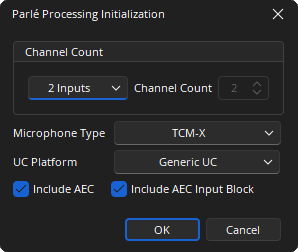
Channel Count: Specifies the number of channels in the block.
Microphone Type: Choose microphone type from the drop-down.
UC Platform: Choose the Unified Communications (UC) platform used in the room. If the platform used in the room is not listed, choose 'Generic UC'.
Include AEC: AEC is included as part of the Parlé Processing Block.
Include AEC Input Block: AEC Input block is included as part of the Parlé Processing and AEC Ref blocks.
Parlé Processing blocks placed in Tesira 3.15 or earlier (referred to as a "Legacy Parlé Processing block") cannot be edited to change the Microphone Type or UC Platform. To change these attributes, the user must delete the existing "Legacy Parlé Processing block" and replace it with a new Parlé Processing block. This restriction on editing the Microphone Type and UC Platform does not apply to Parlé Processing blocks placed in Tesira 3.16 or newer
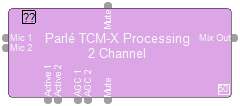
Optional:

See the Logic Charts page of System Control for more information.
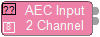
The AEC Reference Block will function the same as if the AEC Reference Block and the AEC Block are dropped together. The AEC input block can be used to bring analog microphone or line inputs into Tesira without any AEC processing function.
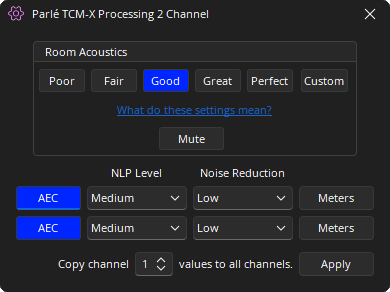
The Parlé Processing control Dialog allows the user to set the acoustic quality of the room to optimize the sound of the microphone(s).
| Room Acoustics | Noise Floor | Reverb Time (RT60) | Max, Mic-to-Talker Distance | ||
|---|---|---|---|---|---|
| TCM-1 | TCM-X | TTM-X | |||
| Poor | more than 45 dBA | more than 1000 ms | 1.5 meters (5 feet) | 1.8 meters (6 feet) | 1 meter (3.3 feet) |
| Fair | 39-45 dBA | 500-1000 ms | 2 meters (6.5 feet) | 2.3 meters (7.5 feet) | 1.3 meters (4.3 feet) |
| Good | 37-39 dBA | 400-500 ms | 2.4 meters (8 feet) | 3 meters (10 feet) | 1.7 meters (5.6 feet) |
| Great | 35-37 dBA | 300-400 ms | 3 meters (10 feet) | 3.8 meters (12.5 feet) | 2.1 meters (6.9 feet) |
| Perfect | less than 35 dBA | less than 300 ms | 4 meters (13 feet) | 5 meters (16.3 feet) | 2.5 meters (8.2 feet) |
| Custom | |||||
These settings correspond with those available in the Parlé microphone coverage calculator available using Biamp Conference Room Designer.
Mute: Turns the input signal off for all microphones.
AEC: (Only if 'Include AEC' is selected at initialization) Enables and disables the AEC processing chain.
NLP Level: (Only if 'Include AEC' is selected at initialization) Non-Linear Processing (NLP) is a stage of the Acoustic Echo Cancellation (AEC) process designed to eliminate residual echo in reverberant rooms with high RT60 times. While setting NLP 'high' may reduce echo in these rooms, it has a negative effect on double talk. Typically the lowest possible NLP setting to eliminate echo achieves the best system performance. A good practice is to start with a low setting and work upwards till echo can be no longer heard.
Noise Reduction: (Only if 'Include AEC' is selected at initialization) Reduces steady-state background noises, such as HVAC systems, fans, motors, or other mechanical devices, that may be picked up by the conferencing microphones and transmitted to the far end. Use the lowest setting that achieves the desired level of background noise reduction.
Meters: (Only if 'Include AEC' is selected at initialization) AEC is included as part of the Parlé processing.
Note: AEC controls are included to further fine-tune the room.
The AEC input block can be used to bring analog microphone or line inputs into Tesira without any AEC processing function.
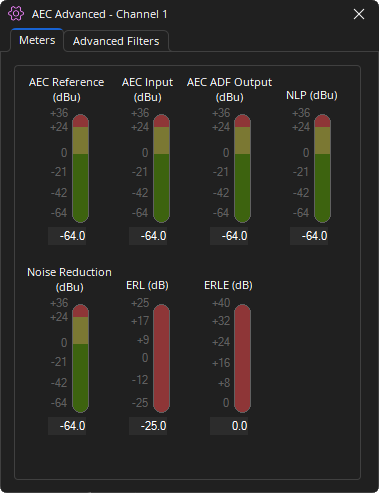
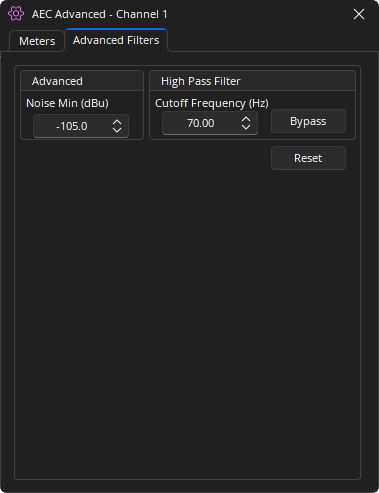
The Custom Mode allows users to tune the room acoustic settings via the sub-blocks within the Parlé Processing container.
Parlé Processing with 2 Channels in Custom mode:
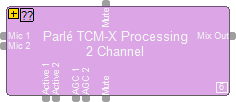
Signal flow for the Parlé Processing Block:

The sub-blocks within the Parlé Processing Block can be controlled from the corresponding Control Dialog. Double click on the sub-blocks to edit the settings.