 Comms - USB / Bluetooth
Options for the USB / Bluetooth models are listed below. These models include Tesira EX-USB / Tesira EX-UBT / TesiraFORTÉ USB X / TesiraFORTÉ Rackmount USB.
Tesira EX-USB
The Tesira EX-USB is a remote-proxied hardware device that provides a USB interface to connect USB host devices to the Tesira AVB network. See the Tesira EX-USB Hardware Installation and Setup Guide on Biamp downloads and the Using the Tesira EX-UBT or EX-USB article on Cornerstone for additional information.
Initialization Dialog
When the Tesira EX-USB is selected from the Device Type drop-down menu, the EX-USB Initialization dialog window displays.
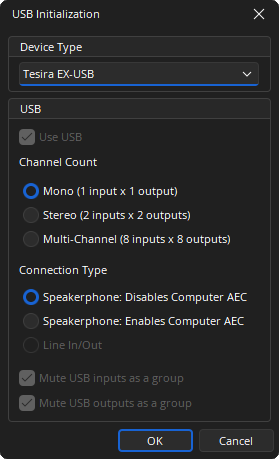
Use USB: This checkbox is fixed on the EX-USB initialization.
Channel Count: Allows the user to select between 3 channel configurations.
- Mono: 1 input x 1 output channel
- Stereo: 2 inputs x 2 output channels
- Multi-Channel: 8 inputs x 8 output channels
Connection Type: Offers single or stereo audio input and output streams for use with a soft codec application on a PC. The USB Input represents the incoming audio from the soft codec and the USB Output is used to send audio to the far side.
- Speakerphone, Disables Computer AEC: Acoustic Echo Cancellation (AEC) is provided by the AEC block in the Tesira audio DSP. A control message is transmitted to the soft codec via the USB link to disable its internal AEC.
- Speakerphone, Enables Computer AEC: Used when the soft codec provides the AEC function.
- Line In/Out: Provides up to 8 channels of audio. Combinations of 2, 4, 6. or 8 total USB channels can operate in fixed 24/16 Bit, 48 kHz.
Mute USB Input as a Group: Mutes input channels when the mute state of a single input channel is changed. Once selected it cannot be deselected if either of the Speakerphone USB terminal types is selected. It is checked by default if the Line In/Out USB terminal type is selected.
Mute USB Outputs as a Group: Mutes output channels when the mute state of a single output channel is changed. Once selected, it cannot be deselected if either of the Speakerphone USB terminal types is selected. It is checked by default if the Line In/Out USB terminal type is selected.
Note: For Host operating system controls:
- "USB host" refers to the USB on the PC.
- Changes to the USB Host Mute and Record Level Controls are ignored by the EX-USB in Multi-Channel 8x8 Line In/Line Out mode.
- Balance controls do not synchronize between the USB Input Block and the USB Host when in Speakerphone Mode. (Only playback levels are)
- Files created with Tesira 3.17 or newer initialize the USB Block minimum level to -50. This allows an accurate map to the host PC volume ramp range and rate. Microsoft, Chrome, OS, etc. May have minor behavioral differences for Mute at Minimum Level.
- In Speakerphone Mode, the minimum/maximum levels of the EX-USB USB Input Block can only be adjusted while offline. The audio volume does not change when the slider is moving in the USB Input Block (left/right) until the mouse is released.
- Changing the minimum/maximum via TTP is prohibited when in Speakerphone Mode.
DSP Block Representation

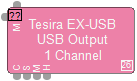
See the Logic Charts page of System Control for more information.
Input/Output Control Dialog
Input
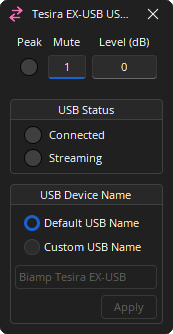
Peak: An indicator flashes when the input signal is within 6dB of clipping. Dark: Off / Red: On.
Mute: Turns the input signal on/off. Dark: Off / Red: On.
Level: Adjusts the relative input volume. Range of -100 to 0.
USB Status: Displays Connected and Streaming status. Dark: Off / Red: On.
USB Device Name: When blank the default name is EX-USB. The Custom USB device name supports alphanumeric characters and spaces with no spaces at the beginning or end. This feature may not work reliably with Mac OSX.
Output
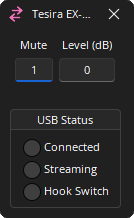
Mute : Turns the input signal on/off.
Level : Adjusts the relative output volume. Range of -100 to 0.
USB Status : Connected, Streaming, and Hook Switch status displays. Dark: Off / Green: On.
Tesira EX-UBT
The Tesira EX-UBT is a remote-proxied hardware device that provides a USB and Bluetooth interface to connect USB host devices to the Tesira AVB network. See the EX-UBT Installation and Operation Guide on Biamp Downloads and the Using the Tesira EX-UBT or EX-USB article on Cornerstone for additional information.
Initialization Dialog
When the Tesira EX-UBT is selected from the Device Type drop-down menu, the EX-UBT Initialization dialog window displays.
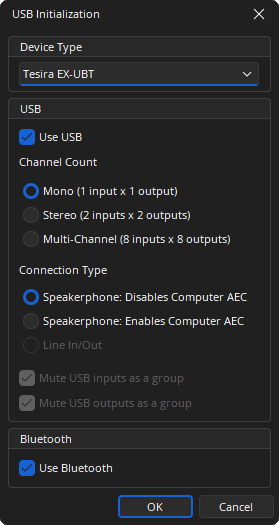
Use USB: The user may check use USB.
Channel Count: Allows the user to select between 3 channel configurations.
- Mono: 1 input x 1 output channel
- Stereo: 2 inputs x 2 output channels
- Multi-Channel: 8 inputs x 8 output channels
Connection Type: Offers single or stereo audio input and output streams for use with a soft codec application on a PC. The USB Input represents the incoming audio from the soft codec and the USB Output is used to send audio to the far side.
- Speakerphone, Disables Computer AEC: Acoustic Echo Cancellation (AEC) is provided by the AEC block in the Tesira audio DSP. A control message is transmitted to the soft codec via the USB link to disable its internal AEC.
- Speakerphone, Enables Computer AEC: Used when the soft codec provides the AEC function.
- Line In/Out: Provides up to 8 channels of audio. Combinations of 2, 4, 6. or 8 total USB channels can operate in fixed 24/16 Bit, 48 kHz.
Mute USB Input as a Group: Mutes input channels when the mute state of a single input channel is changed. Once selected it cannot be deselected if either of the Speakerphone USB terminal types is selected. It is checked by default if the Line In/Out USB terminal type is selected.
Mute USB Outputs as a Group: Mutes output channels when the mute state of a single output channel is changed. Once selected, it cannot be deselected if either of the Speakerphone USB terminal types is selected. It is checked by default if the Line In/Out USB terminal type is selected.
Use Bluetooth: The user may check use Bluetooth.
Note: For Host operating system controls:
- "USB host" refers to the USB on the PC.
- Changes to the USB Host Mute and Record Level Controls are ignored by the EX-UBT in Multi-Channel 8x8 Line In/Line Out mode.
- Balance controls do not synchronize between the USB Input Block and the USB Host when in Speakerphone Mode. (Only playback levels are)
- Files created with Tesira 3.17 or newer initialize the USB Block minimum level to -50. This allows an accurate map to the host PC volume ramp range and rate. Microsoft, Chrome, OS, etc. May have minor behavioral differences for Mute at Minimum Level.
- In Speakerphone Mode, the minimum/maximum levels of the EX-UBT USB Input Block can only be adjusted while offline. The audio volume does not change when the slider is moving in the USB Input Block (left/right) until the mouse is released.
- Changing the minimum/maximum via TTP is prohibited when in Speakerphone Mode.
DSP Block Representation
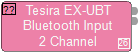
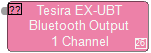
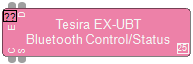
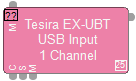
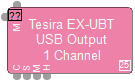
See the Logic Charts page of System Control for more information.
Control/Status Dialog
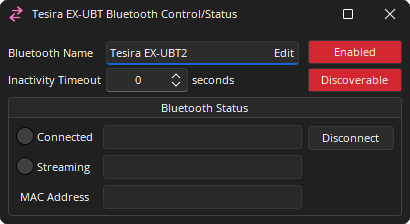
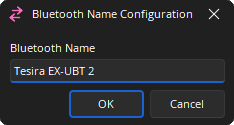
Bluetooth Name: The Bluetooth Name is changed by clicking the "edit" button. The name displays in the device list when pairing the EX-UBT with a 3rd part device. The Bluetooth Name is changed by clicking the "edit" button. The name displays in the device list when pairing the EX-UBT with a 3rd part device.
Enabled: Turns the Bluetooth module on/off.
Inactivity Timeout: Automatically disconnects the Bluetooth if the connection is idle.
Disoverable: Displays the availability of the EX-UBT Bluetooth connection to devices within range.
Bluetooth Status
Connected: 3rd party devices connected to the EX-UBT display in the Connected field. Device controls the EX-UBT audio levels and muting.
Disconnect: Disconnect drops the active connection.
Bluetooth Status Streaming: Offers streaming profile information when a connection is active. (this field is not editable)
MAC Address: The Bluetooth MAC address of the EX-UBT device displays to confirm which device is paired/connected.
Once discoverable, the EX-UBT displays under Bluetooth-enabled 3rd-party devices. The connected device controls the EX-UBT audio levels and muting. The 3rd-party device name displays in the Connected field when paired (The EX-UBT must be selected from the Bluetooth device list to connect).
Other Bluetooth Considerations
The EX-UBT Bluetooth module supports the following subset profiles:
- Hands-free Profile (HFP)
- Advanced Audio Distribution Profile (A2DP)
The A2DP is supported as an audio sink and allows receipt of the following codecs:
- SBC
- Qualcomm® aptX™ audio
- AAC
The EX-UBT is confirmed to support connections from devices running the following operating systems:
- iOS 8, 9, 10,11
- Android 4, 5, 6, 7, 8
Other operating systems may be supported but have not been conformed or will be confirmed at a future date.
The EX-UBT also comes with Near Field Communication (NFC) tags, which allow users to pair a mobile device via Bluetooth by tapping the device on the tag. The user's device must have the NFC function enabled. At this time Apple® products do not support NFC compatibility with non-Apple products, therefore iOS devices will not be able to pair via the NFC tags.
Input/Output Control Dialog
Input
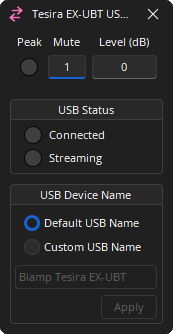
Peak: An indicator flashes when the input signal is within 6dB of clipping. Dark: Off / Red: On.
Mute: Turns the input signal on/off. Dark: Off / Red: On.
Level: Adjusts the relative input volume. Range of -100 to 0.
USB Status: Displays Connected and Streaming status. Dark: Off / Green: On.
USB Device Name: When blank the default name is EX-UBT. The Custom USB device name supports alphanumeric characters and spaces with no spaces at the beginning or end. This feature may not work reliably with Mac OSX.
Output
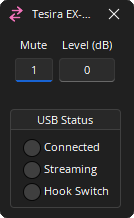
Mute : Turns the input signal on/off.
Level : Adjusts the relative output volume. Range of -100 to 0.
USB Status : Connected, Streaming, and Hook Switch status displays. Dark: Off / Green: On.
Bluetooth Input/Output Control Dialog
Input
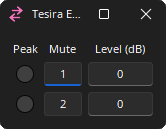
Peak: An indicator flashes when the input signal is within 6dB of clipping. Dark: Off / Red: On.
Mute: Turns the input signal on/off. Dark: Off / Red: On.
Level: Adjusts the relative input volume. Range of -100 to 0.
Output
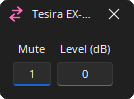
Mute : Turns the input signal on/off.
Level : Adjusts the relative output volume. Range of -100 to 0.
Note: Hardware revisions exist to accommodate component updates and performance enhancements. Tesira firmware is engineered to auto-detect a device's revision and manage its specific capabilities. Please use the latest Tesira software and maintain version parity for device firmware to ensure full compatibility.
TesiraFORTÉ X
USB X is available on TesiraFORTÉ X and EX-UBT devices (see EX-UBT for USB information specific to the device). USB connections may require the Asynchronus clocking mode to be disabled. See USB Considerations for details and review the USB Clocking and Synchronization section if audible artifacts are heard on USB streams.
Initialization Dialog
When the TesiraFORTÉ X is selected from the Device Type drop-down menu, the TesiraFORTÉ X Initialization dialog window displays.
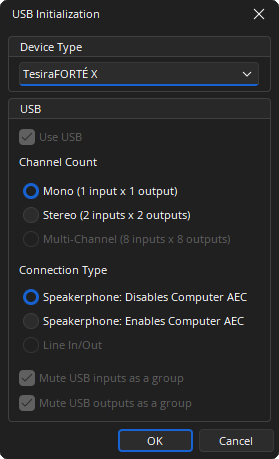
Use USB: This checkbox is fixed on the TesiraFORTÉ X initialization.
Channel Count: Allows the user to select between 3 channel configurations.
- Mono: 1 input x 1 output channel
- Stereo: 2 inputs x 2 output channels
- Multi-Channel: 8 inputs x 8 output channels
Connection Type: Offers single or stereo audio input and output streams for use with a soft codec application on a PC. The USB Input represents the incoming audio from the soft codec and the USB Output is used to send audio to the far side.
- Speakerphone, Disables Computer AEC: Acoustic Echo Cancellation (AEC) is provided by the AEC block in the Tesira audio DSP. A control message is transmitted to the soft codec via the USB link to disable its internal AEC.
- Speakerphone, Enables Computer AEC: Used when the soft codec provides the AEC function.
- Line In/Out: Provides 2 channels of audio and operates in fixed 24/16 Bit, 48 kHz.
Mute USB Input as a Group: Mutes all USB X input channels when the mute state of a single input channel is changed. Once selected it cannot be deselected if either of the Speakerphone USB X terminal types is selected. It is checked by default if the Line In/Out USB X terminal type is selected.
Mute USB Outputs as a Group: Mutes all USB X output channels when the mute state of a single output channel is changed. Once checked, this selection cannot be deselected if either of the Speakerphone USB X terminal types is selected. It is checked by default if the Line In/Out USB X terminal type is selected.
Note: For Host operating system controls:
- "USB host" refers to the USB X on the PC.
- Balance controls do not synchronize between the USB X Input Block and the USB X Host when in Speakerphone Mode.
- The USB X Block initializes minimum level to -50 to map the host PC volume ramp range and rate. Various operating systems may have minor behavior differences regarding mute at minimum level.
- Speakerphone Mode min/max levels may be exceeded by the USB host device.
- Speakerphone Mode min/max levels of the EX-UBT USB X input Block can be adjusted while the software is offline. The audio volume will not change until the mouse is released in the USB X Block.
- When in Speakerphone Mode changing the min/max via TTP is prohibited.
Channel Initialization
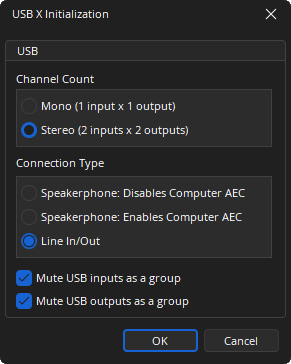
If the 'Use USB' option is selected from a FORTÉ X Audio Object Initialization the following dialog is displayed. The options available in this initialization operate as described in the USB initialization overview above.
DSP Block Representation
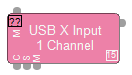
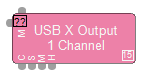
See the Logic Charts page of System Control for more information.
Input/Output Control Dialog
Input
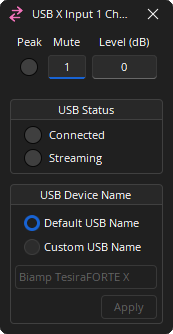
Peak: An indicator flashes when the input signal is within 6dB of clipping. Dark: Off / Red: On.
Mute: Turns the input signal on/off. Dark: Off / Red: On.
Level: Adjusts the relative input volume. Range of -100 to 0.
USB Status: Displays Connected and Streaming status. Dark: Off / Green: On.
USB Device Name: Allows the user to enter a USB X device name that will be visible in Windows. If left blank, the default naming will be EX-UBT <serial number>. The USB X device name only supports alphanumeric characters and spaces. Do not use spaces at the beginning or end of the device name.
Output
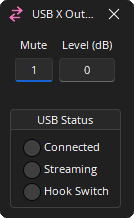
Mute : Turns the input signal on/off.
Level : Adjusts the relative output volume. Range of -100 to 0.
USB Status : Connected, Streaming, and Hook Switch status displays. Dark: Off / Green: On.
TesiraFORTÉ
USB is available on TesiraFORTÉ and EX-UBT devices (see EX-UBT for USB information specific to that device). The USB initialization dialog allows the selection of three different operational modes. See USB Considerations for more details. USB connections may require the Asynchronus clocking mode to be disabled. Please review the USB Clocking and Synchronization section if audible artifacts are heard on USB streams.
Initialization Dialog
When the TesiraFORTÉ is selected from the Device Type drop-down menu, the TesiraFORTÉ Initialization dialog window displays.
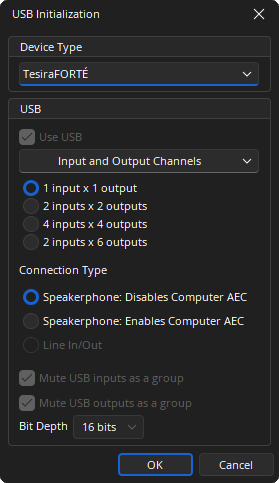
USB: This checkbox is fixed on the TesiraFORTÉ initialization.
Channels: Provides a drop-down menu of channel options:
- Input and Output Channels: 1x1, 2x2, 4x4, or 2x6 input & output combinations.
- Input Channels Only: 2, 4, or 8 inputs.
- Output Channels Only: 2, 4, 6, or 8 outputs.
Connection Type: Offers single or stereo audio input and output streams for use with a soft codec application on a PC. The USB Input represents the incoming audio from the soft codec and the USB Output is used to send audio to the far side.
- Speakerphone, Disables Computer AEC: The TesiraFORTÉ unit will provide the Acoustic Echo Cancellation (AEC) function, and a control message is transmitted to the soft codec via the USB link telling it to disable its internal AEC. This would be appropriate for TesiraFORTÉ models that have built-in AEC (CI, TI, VI, and VT)
- Speakerphone, Enables Computer AEC: Used when the soft codec provides the AEC function.
- Line In/Out: Provides up to 8 channels of audio. Combinations of 2, 4, or 6 total USB channels can operate in fixed 16 or 24 Bit depth control. Combinations of 8 USB channels operate in 16-bit mode only.
Mute USB Input as a Group: N/A
Mute USB Outputs as a Group: N/A
Bit Depth: Selection of either 16 or 24 bits.
Note: There is no AEC capability on the USB inputs since they are line level sources and/or far end sources. Microphones used in distance conferencing should be connected to AEC inputs.
Note: When operating in FORTÉ Only Mode added USB Blocks are disabled on the I/O menu.
Channel Initialization
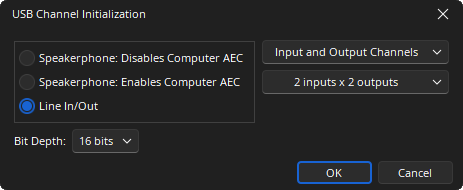
If the 'Use USB' option is selected from a FORTÉ Audio Object Initialization the following dialog is displayed. The options available in this initialization operate as described in the USB initialization overview above.
DSP Block Representation
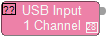
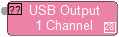
Control Dialog
Input
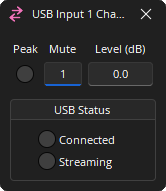
Peak: An indicator flashes when the input signal is within 6dB of clipping.
Mute: Turns the input signal on/off.
Level: Adjusts the relative input volume. Range of -100 to +12.
USB Status: Displays Connected and Streaming status. Dark: Off / Green: On.
Output
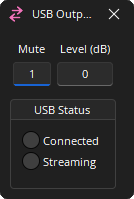
Mute: Turns the input signal on/off.
Level: Adjusts the relative input volume. Range of -100 to 0.
USB Status: Displays Connected and Streaming status. Dark: Off / Green: On.